----------------------------------------------------------------------
【Voltage Compatibility】
When using electrical appliances, please note that they are designed for Japanese voltage specifications (90-110V), so if you use them with a different voltage, it may cause a malfunction.
【Plug Type】
Our products use Japanese plug types (A or B type).
Please use a conversion adapter if necessary.
【Important Note on Transformers and Adapters】
A transformer adjusts voltage to match your device’s requirements.
A conversion adapter only changes the plug shape and does not adjust voltage.
Using only a conversion adapter without a transformer may result in damage to the product.
【Liability】
We are not responsible for malfunctions or damages caused by improper use, such as operating the product without a transformer.
----------------------------------------------------------------------
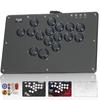
【Features and Compatibility】: The PXN-008 wired fighting joystick, USB arcade game controller, is compatible with PS3/PS4/N-Switch/PC Windows (7/8/10)/Android TV boxes/Android mobile phones (OTG function required). Note: MAC and iOS system devices are not supported. This item is not compatible with PS5.
[Immersive Gaming Experience] Combine the 8 directional joysticks and 8 large action buttons to match the characters in the game and perform one-time actions; you are the hero! Arcade game compatibility: "Street Fighter", "Fighter King", "Real Fight", "Tekken", etc.
[TURBO Function Settings (Rapid Fire)] 1. TURBO is assigned to the A, B, X, Y, LB, RB, LT, and RT buttons. 2. How to set TURBO: You can set the function. Press the TURBO key and the button you want to set the TURBO function to simultaneously, and the LED will blink. 3. How to clear TURBO: Press TURBO, and the LED will stop blinking and turn off. Press the key and the button that has the TURBO function set to it simultaneously.
【Two Joystick Modes】: The joystick has two modes, DP/LS, allowing you to switch between directional key mode and D key mode to suit different gameplay styles and provide a better control experience. 【Joystick Audio Function】: When used with PS4 or X-ONE/SERIES hosts, two-way audio functionality is enabled, allowing for voice communication during gameplay.
【Ergonomic Design】: Simulates arcade joysticks and buttons with high wear-resistant steel joysticks and durable action buttons. Classic circular rocker, 360° wide-angle limit action and 8 large action buttons, green switch mechanical buttons, poor sensitivity, fast response, brittle, clear, buttons tested for 50 million presses.
[Troubleshooting]: 1. If the background light is on when you connect the stick to the host but it doesn't work, unplug and replug it, or check if the guide controller is working correctly. 2. If the stick is unresponsive and the host screen is frozen, the host may have shut down unintentionally, so restart the host and then connect the stick. 3. If the stick operation is not appropriate during gameplay, unplug and replug the stick and reconnect it. 4. When connecting the guide controller, you need to turn off the guide controller. Do not let it connect automatically and the guide succeed.
If you experience a delay while playing, try switching to stick mode by following these steps: 1. Set the stick switch to the "DP" icon position. At this time, the directional stick on each host will function as a "directional pad". 2. Switch the stick switch to the "LS" icon position. At this time, the directional stick will function as the "left stick" on each host. If neither the test button nor the joystick responds, and the console screen does not move, your body may have crashed. Restart the console and reconnect the joystick.


 Zwrot w przypadku braku dostawy




![Mayflash Joystick F300 kompatybilny z mini japońskimi PS4/PS3/XBOX ONE/XBOX 360/PC/Android/Nintendo Switch/Neogeo [Oryginalny produkt]](https://img.joomcdn.net/624ee800b20e883246808d185d2e14d09b014eae_100_100.jpeg)


